
Where Shopify Bundle Data Lives: Cart vs. Order
TLDR
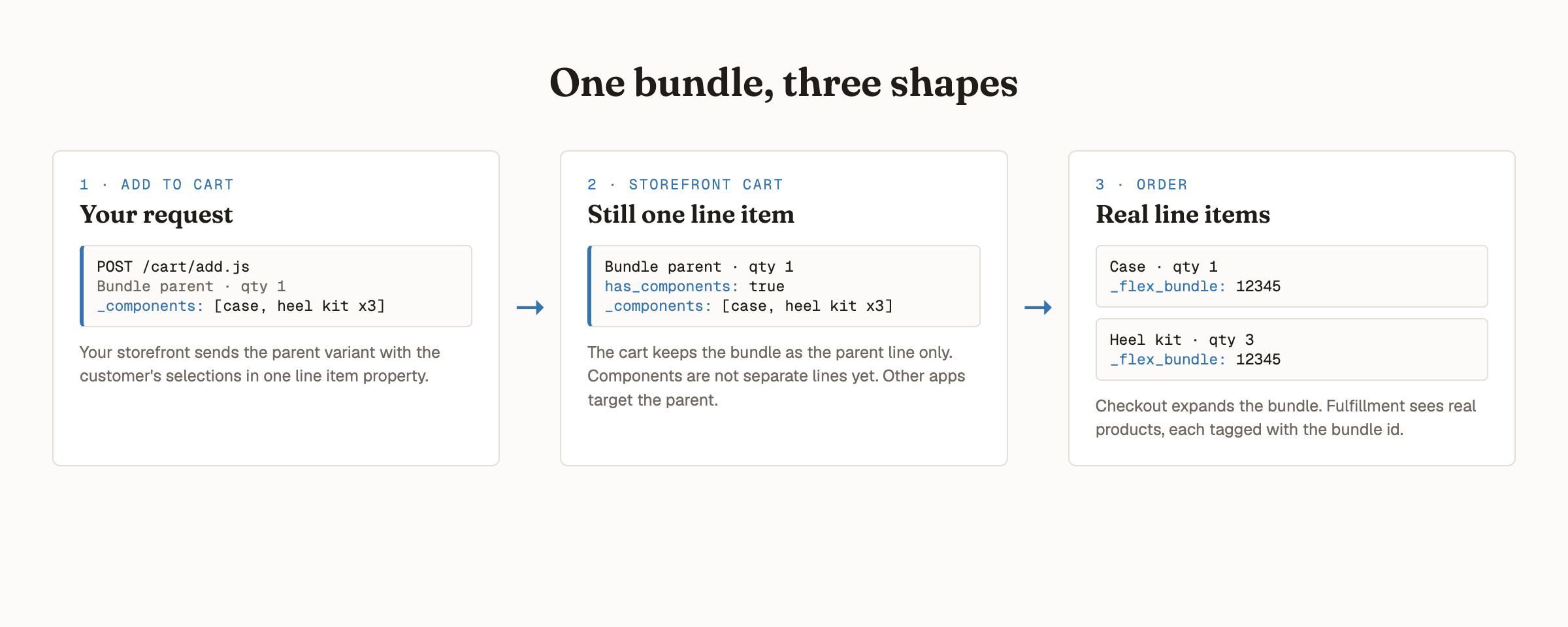
- A bundle takes three shapes on Shopify: the add-to-cart request, the storefront cart, and the order
- In the storefront cart, a bundle is still a single line item: the parent, with a has_components: true flag. Components are not separate lines yet
- Expansion happens at checkout. On the order, components are separate real line items, each carrying a _flex_bundle identifier
- Storefront apps (discounts, B2B pricing) should target the parent; fulfillment and analytics read the broken-out order line items
Every few weeks I get a version of the same technical question, usually from a merchant evaluating Flex Bundles alongside another app: a wholesale pricing tool, a discount app, a fulfillment platform. The question is some form of "where do I read the bundle data?"
It's a good question, because the answer changes depending on where you look. A bundle takes three different shapes on its way from the product page to the warehouse, and most integration confusion comes from expecting one stage's shape at a different stage.
Shape 1: the add-to-cart request
Your storefront adds a bundle by POSTing the parent variant to /cart/add.js, with the customer's
selections packed into a single line item property called _components: an array of variant ids,
quantities, and optional per-component attributes.
This request is only visible to the code that sends it. If another app needs bundle data, it should never try to intercept this request; it should read from one of the next two surfaces instead.
Shape 2: the storefront cart
Here's the part that surprises people, including, occasionally, me: in the cart, the bundle is still one line item.
Even though the Cart Transform is registered and ready, the cart object on the storefront
(/cart.js, or the Liquid cart object in your theme) shows the parent variant as a single line,
carrying the _components property you submitted plus a Shopify-native flag:
has_components: true. The components are not separate line items. This shape is stable across
page reloads and cart updates for the life of the cart.
Expansion doesn't happen in the cart. It happens at checkout.
This has a practical consequence for any app that works on cart-level pricing, like B2B wholesale
tools or discount apps: there are no component line items to exclude from your logic, because they
don't exist yet. To keep bundles out of another app's pricing rules, target the parent product or
variant, or detect bundle lines generically via has_components. That's usually a simpler rule
than the per-component matching people expect to need.
Shape 3: the order
Post-purchase, the picture inverts. On the order object, the expansion is complete: the components are separate, real line items, with real SKUs, quantities, and prices that add up to exactly what the customer paid.
Each component line item carries a _flex_bundle property with the bundle parent's product GID, plus any custom
attributes your storefront passed at add-to-cart (an engraving, a size, a gift message). This is
the surface fulfillment software, 3PLs, and order management systems read, and it's why bundles
built this way ship correctly: the warehouse sees actual products, not one mystery SKU.
Orders containing a bundle also get tagged flex-bundles-has-bundle and carry a
bundle_breakdown metafield, which makes bundle orders queryable in Shopify's order search,
Segments, and Flow.
The cheat sheet
| Integration | Read from | Identify bundles by |
|---|---|---|
| Discount or B2B pricing app | Cart | Parent product/variant, or has_components: true |
| Fulfillment, 3PL, OMS | Order line items | _flex_bundle on each component |
| Analytics, flows, segmentation | Order | flex-bundles-has-bundle tag, bundle_breakdown metafield |
| Theme code rendering the cart | Cart | _components on the parent line |
Why this design is the right one
The two-shape system isn't an accident of the platform; it's the thing that makes native bundles work. The cart keeps the bundle atomic, so a customer can't remove half of it and keep the discount, and other apps have exactly one line to reason about. The order breaks it apart, so pricing, inventory, and fulfillment operate on real products. Each surface gets the shape it actually needs.
If you're wiring Flex Bundles up to another app and want a second pair of eyes on the integration, the full reference lives in the Cart API integration docs, and I'm happy to look at your specific setup. I've reviewed these integrations with several merchants' partner apps, and the answer is almost always simpler than the question.
Frequently Asked Questions
Are bundle components separate line items in the Shopify cart?
No. With Cart Transform bundles, the storefront cart (cart.js and the Liquid cart object) holds a single line item: the bundle parent, with a Shopify-native has_components: true flag and the bundle's line item properties. The components become separate line items only when checkout expands the bundle, so they appear individually on the order.
How can another Shopify app exclude bundle items from its discount logic?
On the storefront cart there is only one line to consider: the bundle parent. A discount or wholesale pricing app can exclude bundles by targeting the parent product or variant, or by detecting the has_components flag. Per-component exclusion is not needed in the cart, because component line items do not exist there.
How does fulfillment software identify which order line items belong to a bundle?
On the order, every component is a separate line item carrying a _flex_bundle property with the bundle parent's product GID, plus any custom attributes passed at add-to-cart. Orders containing a bundle are also tagged flex-bundles-has-bundle and carry a bundle_breakdown metafield.